AI-Powered CRM Intelligence Pipeline
Role: Team Lead Type: AI Automation · Data Engineering Timeline: 2025–2026 Stack: Salesforce · HubSpot · Google Sheets · n8n · Zapier · Local LLM · RAG
The Problem
Sales and operations teams are drowning in data they can’t use.
CRM systems hold valuable signals — deal velocity, lead quality, churn risk — but getting to those signals means someone spends hours every week pulling exports, cleaning duplicates, reconciling spreadsheets, and rebuilding the same report they built last month.
The tools exist. The data exists. The bottleneck is the manual layer in between.
We were brought in to remove it.
My Role
I led the end-to-end design and delivery of this project — from scoping the data architecture to coordinating the build across the team. That meant owning the decisions that mattered: which integrations to prioritize, where to put the AI layer, and how to make the outputs trustworthy enough for a sales team to actually act on.
What We Built
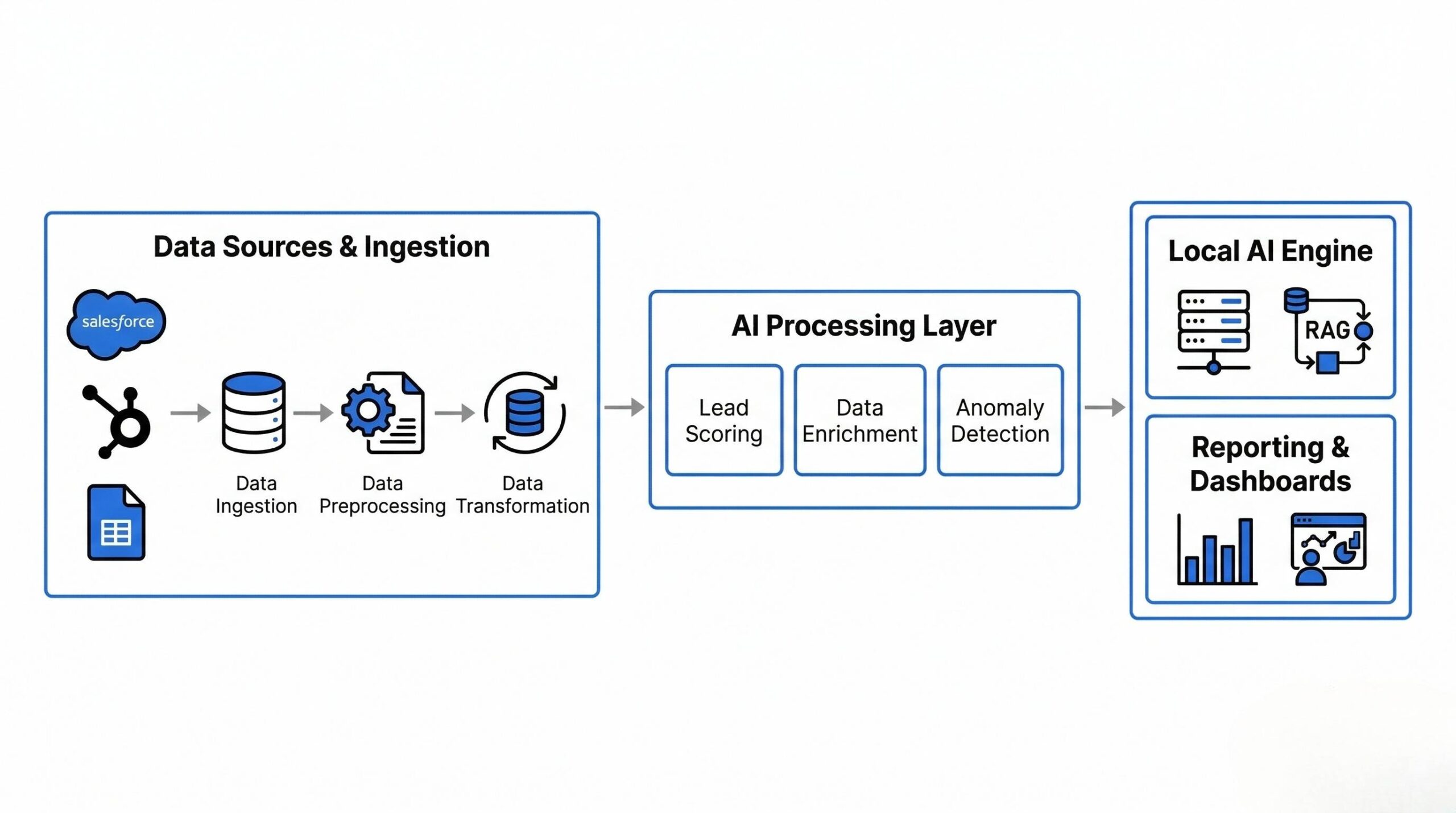
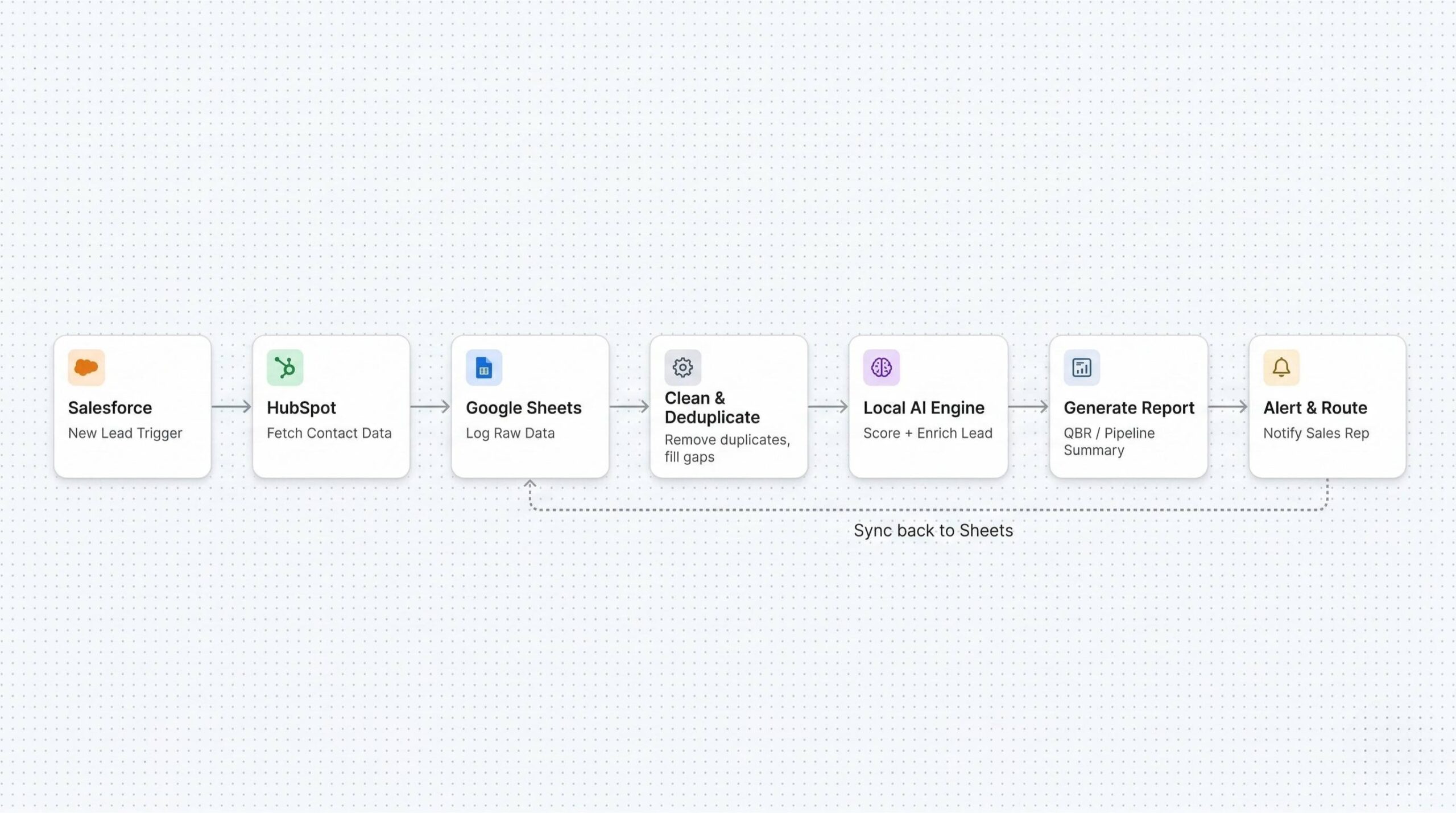
A multi-source data pipeline that connects CRM platforms and spreadsheets into a single automated intelligence layer. Data flows in from Salesforce, HubSpot, and Google Sheets, gets cleaned and enriched, passes through a local AI engine, and comes out as reports, scored leads, and queryable insights — on a schedule or in real time.
Architecture & Technical Decisions
Ingestion Layer
We built automated connectors pulling from Salesforce and HubSpot APIs, with Google Sheets acting as both a source and a live destination. Two-way sync keeps contact records, deal stages, and activity logs consistent without manual intervention.
Key tools: n8n (primary orchestration), Zapier (lightweight triggers), Supermetrics, Windsor.ai
The decision to use n8n as the backbone was deliberate — it runs self-hosted, gives us full control over credentials and data routing, and doesn’t send sensitive sales data through a third-party cloud.
Cleaning & Enrichment Layer
Raw CRM data is unreliable. Reps log things differently. Fields get skipped. The same company appears under three names. Before any AI touches the data, the pipeline runs:
- Duplicate detection and record merging
- Missing field completion
- Format and schema standardization across sources
- Enrichment from available external signals
This was the unglamorous work that made everything downstream actually useful. Skipping it produces confidently wrong AI outputs.
Local AI Processing
Cleaned data feeds into a locally-hosted LLM — no external API calls, no customer data leaving the infrastructure. We used a RAG architecture so the model retrieves relevant context (historical deals, product info, ICP criteria) before generating any output.
What the AI layer handles:
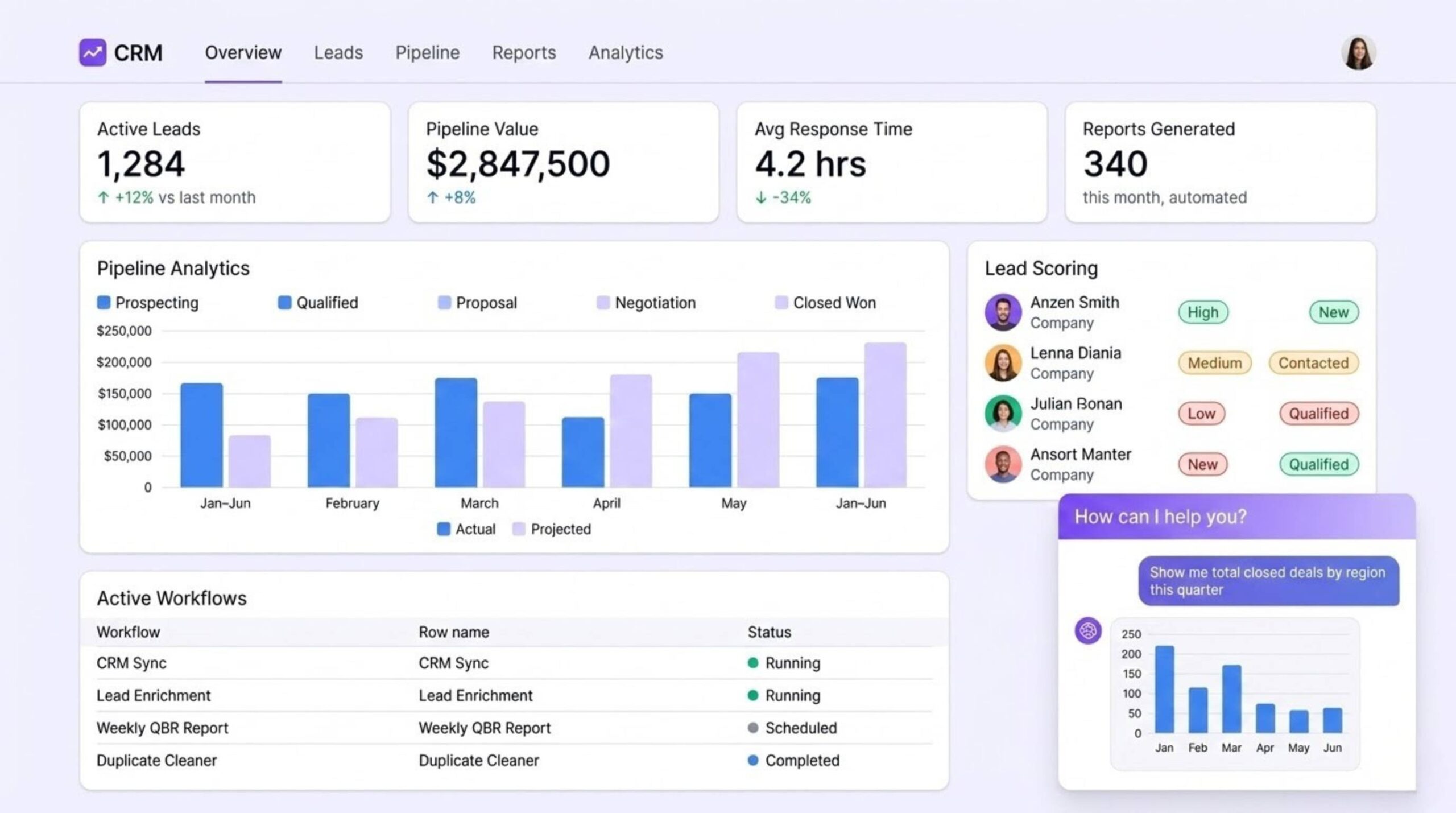
- Lead scoring — evaluates inbound leads against ideal customer profile criteria, ranks by priority, routes to the right rep automatically
- Report generation — produces structured pipeline reviews, QBRs, and churn risk summaries from multi-source data
- Anomaly detection — flags deals that have gone cold, unusual drop-offs in activity, or pipeline gaps before they become a problem
Natural Language Query Interface
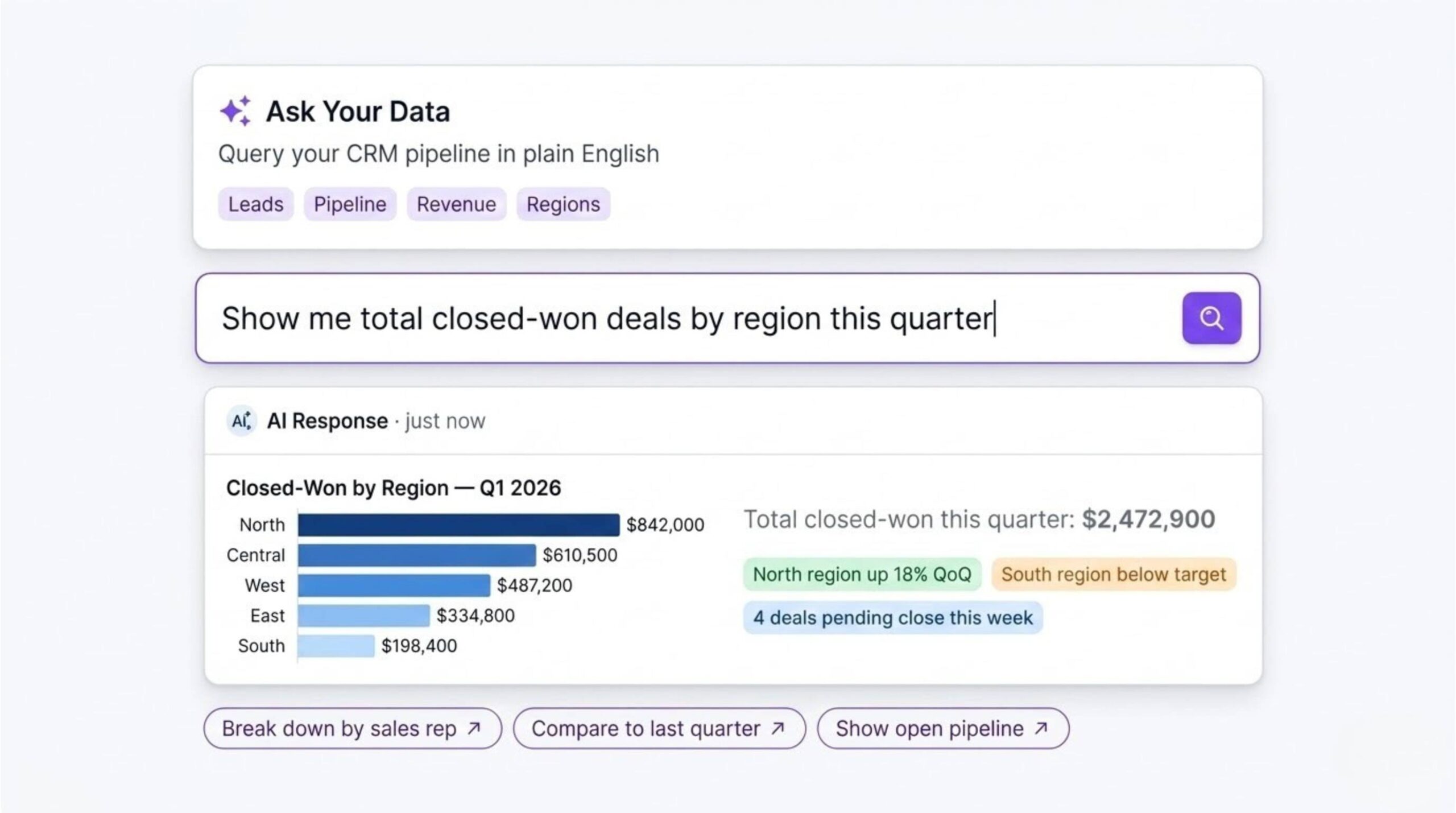
We added a conversational query layer so non-technical users can interrogate their data directly — no formulas, no pivot tables. A sales manager can type “show me closed-won deals by region this quarter” and get a formatted answer in seconds.
Output Layer
Processed data surfaces in real-time dashboards. Threshold-based alerts fire when deals stall, lead response time spikes, or pipeline coverage drops. Reports can be triggered on a schedule or generated on demand.
Stack Summary
| Layer | Purpose | Tools |
|---|---|---|
| Ingestion | CRM API pulls + Sheets sync | n8n · Zapier · Supermetrics · Windsor.ai |
| Storage | Structured intermediate store | Google Sheets · Local DB |
| AI Processing | Scoring · Generation · Analysis | Local LLM · RAG · Custom agents |
| Query Interface | Natural language → data retrieval | NL query layer |
| Output | Reports · Dashboards · Alerts | Sheets · Custom UI |
Business Impact
| Metric | Result |
|---|---|
| Manual reporting time | 60–90% reduction |
| Lead routing | Automated — high-priority leads reach reps immediately |
| Data quality | Duplicates and missing fields resolved before analysis |
| Reporting cadence | Weekly manual → real-time, always-on |
| Team capacity | Analysts shifted from data wrangling to actual analysis |
Key Engineering Decisions
Why local AI? Sales pipeline and customer data is sensitive. Running inference locally meant no data touched an external API — and gave us lower latency and no per-query cost at scale.
Why clean before you model? Early on we tested feeding raw CRM data directly into the AI layer. The outputs looked polished. They were also wrong. Inconsistent input produces confident-sounding nonsense. We built the cleaning layer first, then rebuilt trust in the outputs from there.
Why n8n over Zapier for orchestration? Zapier is fast to set up but becomes a constraint at scale — pricing, data routing, and custom logic all hit walls. n8n self-hosted gave us a proper workflow engine we could version, audit, and extend without limits.
What I’d Do Differently
The natural language query layer was scoped in late. It turned out to be one of the most-used features. Running this again, I’d design the data schema with queryability in mind from day one rather than retrofitting it at the end.
AI Automation · Data Engineering · CRM Intelligence LCBYTELAB — 2025–2026